
OTG Adapter Cable USB-C (Type-C) to USB A, 2.0 15cm Silver from subtel – DOOGEE Tab A9; S200; Note58; Blade 10; Oukitel C62
In stock
Shipping: SEK 35.00


Secure payment
Your payment is sent over an SSL-encrypted connection and handled by our payment providers. We do not store your card details.
Your data is protected
We use your data to process your order and do not sell it to third parties. You can find the details in our privacy policy.


Fits your
We have not listed this product as compatible with the
That does not necessarily mean it will not fit — our compatibility list is not exhaustive.
Does this product fit your device?
Description
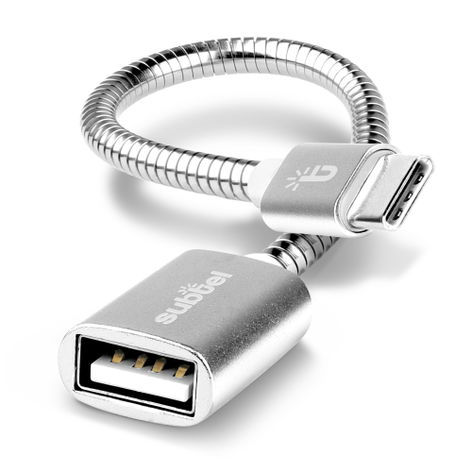
OTG adapter cable for your device – connect USB accessories without a computer, from subtel
Plug USB flash drives, card readers, keyboards, mice or gamepads straight into the listed models with this subtel OTG adapter cable (USB-C (Type-C) to USB A).
Compatible models (selection): DOOGEE Tab A9; S200; Oukitel WP200 Pro; C62; WP300
What makes the subtel OTG cable the right choice?
• File transfer – Copy photos and files to and from USB storage without a PC
• Input devices – Connect a keyboard, mouse or gamepad to the device
• Ready to use – The device must support USB On-The-Go (OTG); check the operating system, accessory and any required app or setup
• Details – 2.0, 15cm, Silver
Product specifications:
Brand: subtel
Connector 1: USB-C (Type-C)
Connector 2: USB A
Standard: 2.0
Length: 15cm
Colour: Silver
Before you buy: your device must support USB OTG; compare the model with the compatibility list.
Compatibility
Compatible models: DOOGEE Tab A9, DOOGEE S200, Oukitel WP200 Pro, Oukitel C62, Oukitel WP300, DOOGEE Note58, Oukitel C68 Plus, DOOGEE Blade 10, Oukitel WP210, Oukitel WP56, Oukitel Y1000, DOOGEE Blade 20, Oukitel C62 PRO, Oukitel WP100, Oukitel WP55 Pro, DOOGEE Fire 3 Ultra, Oukitel C69, DOOGEE Blade GT, DOOGEE Fire 6, DOOGEE S118 Pro, Oukitel WP35 Pro, Oukitel WP53 Pro, Oukitel WP5, Oukitel WP60 5G, DOOGEE S119, Oukitel G5, DOOGEE S Punk Pro, DOOGEE Tab E3, Oukitel C65, Oukitel WP15, Oukitel C21 Pro, Oukitel WP17, Oukitel C17 Pro, Oukitel WP62 5G, Oukitel K9 Pro, Oukitel C65 Pro, Oukitel K9, Oukitel K15 Plus, Oukitel WP12 Pro, Oukitel C21, Oukitel C18 Pro, DOOGEE Note59, Oukitel K10000 Max, Oukitel C19 Pro, Oukitel U25 Pro, Oukitel WP10, Oukitel WP2, Oukitel WP58 Pro 5G, Oukitel K10, Oukitel C19, Oukitel U23, Oukitel U18, Oukitel G3 Rugged Phone, Oukitel C68 Plus-EV, Oukitel G1 S Rugged Phone, Oukitel P1 Pro-EV, Oukitel WP27 4G Rugged Phone, Oukitel WP36 4G
See the Compatibility tab for the complete checked list.
OTG support alone does not establish every accessory function. Check operating-system or app support, storage formats and the accessory’s power requirements. Some USB accessories may need their own power supply.